How to Make AI Slides That Don't Look Generic in 2026

AI didn't make your slides generic. Your brief did.
Most people open ChatGPT, type "make me a slide deck about X," and get something that looks like every other AI-generated presentation on the internet. Same fonts, same layouts, same slides you've seen a hundred times.
The root cause is not the AI tool. The root cause is that most people give AI zero brand context and expect branded output. ChatGPT has no idea what your brand looks like. It has no reference for your typography, your color system, or the visual tone that makes your company feel distinct. So it defaults to generic. The fix is building a small slide system inside ChatGPT before you generate anything. This article walks through the exact 8-step process.
"Most teams obsess over which AI tool to pick and skip the one thing that actually moves the needle: giving the AI real brand context to work with," said Fanis Poulinakis, Founder at Machine Poem.
Why AI presentations always look the same
AI presentation tools default to generic templates because they lack brand context, not because AI cannot produce branded work. Every AI model ships with built-in design defaults: safe color palettes, standard sans-serif fonts, predictable gradient backgrounds. When you prompt without providing your brand's visual identity, the AI has no choice but to fall back on these defaults.
This is the same reason two different companies using the same AI tool produce nearly identical slide decks. The tool is not broken. The input is incomplete.
The three most common symptoms of context-free AI slides:
Overly polished gradients and color palettes that match no existing brand
Generic stock-style imagery that feels disconnected from the company's visual tone
Businessese bullet points that could belong to any company in any industry
What you need before you start
Before generating a single slide, you need four brand assets uploaded to ChatGPT: your logo files, your font names, your color hex codes, and 2-3 existing decks that represent your visual style. Without these, every step that follows produces generic output.
Logo files in PNG or SVG format
Brand color hex codes (primary, secondary, accent)
Font names (headline and body fonts)
2-3 existing slide decks that represent your visual style
If you don't have a formal brand guide, your best recent deck and your website's visual style are enough to start.
The 8-step system for branded AI slides
Using this AI slide system, our clients cut slide production time by 60-70% per deck while keeping everything fully on-brand.
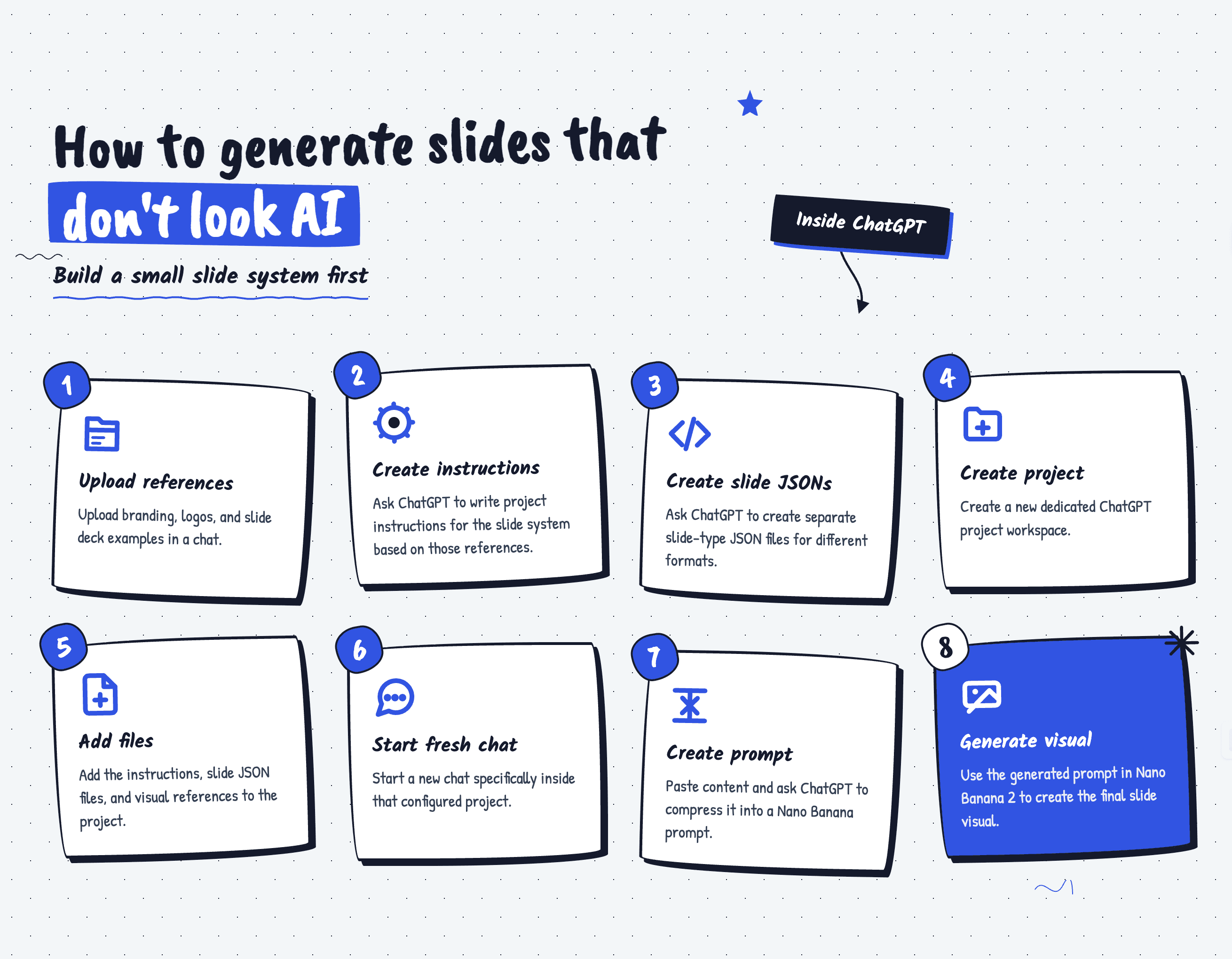
Step 1: Upload your brand references to a new ChatGPT chat
Open a fresh ChatGPT conversation and upload your logo files, color codes, font names, and 2-3 reference decks in a single message. This creates the brand context the AI needs before any slide generation happens. Do not ask it to generate slides yet. This chat is your setup environment.
Step 2: Generate visual instructions from your brand files
Ask ChatGPT to analyze your uploaded brand assets and write a set of visual rules that can be reused across future slide projects. These instructions become the AI's brand memory. The output should specify exact hex codes, font pairings, spacing ratios, and visual tone descriptions.
Step 3: Define slide-type templates as JSON structures
Ask ChatGPT to create JSON templates for each slide type: title slides, content slides, data slides, section dividers, and closing slides. Each JSON defines the layout rules, text hierarchy, and visual treatment specific to that slide type. By defining these as structured templates, you give the AI specific constraints instead of letting it improvise.
Step 4: Create a dedicated ChatGPT project
Create a new ChatGPT Project and paste the visual instructions from Step 2 into the project's custom instructions field. Upload all your brand reference files into the project's file storage. The difference between a regular chat and a Project is persistence: every new conversation starts with your brand rules already loaded.
Step 5: Add all files to the project
Upload the visual instructions document, all slide-type JSON templates, and your original brand reference files into the Project's file storage. This ensures the AI has access to every piece of brand context in every conversation.
Step 6: Start a fresh chat and generate slide prompts
Start a new chat within your branded Project, paste your slide content, and ask ChatGPT to write an image generation prompt following the project's visual instructions. Instead of asking "make me a slide about Q3 revenue," you're asking a brand-aware AI to write a generation prompt that already includes your colors, fonts, layout rules, and visual tone.
Step 7: Generate the slide in Nano Banana 2
Copy the prompt ChatGPT generated and paste it into Nano Banana 2 to generate your branded slide image. Nano Banana 2 is a specialized GPT built for slide image generation. The combination of a brand-encoded prompt and a slide-focused generation model produces output that looks intentional rather than generic.
Step 8: Iterate and scale
Review the generated slide against your reference decks and adjust the prompt if the output drifts from your brand's visual standards. When you find improvements, update your Project instructions. After 10-15 slides, your system gets noticeably better. Share your Project with team members so everyone generates from the same brand-aware system.
This is the system used at Machine Poem for client work. Using it, our clients cut slide production time by 60-70% per deck while keeping everything fully on-brand.
The real problem was never the AI
AI slide tools generate generic output when given generic input. Building a brand-aware system inside ChatGPT takes 30-45 minutes and eliminates the everything looks AI problem permanently.
The companies producing slides that look custom-designed are not using better AI tools. They are giving their AI tools better context. One setup session creates a system that works for every deck, every presentation, and every team member going forward.
If building this system sounds like more work than your team has bandwidth for, that is exactly what Machine Poem handles. We build AI-powered creative systems for SaaS companies so your slides, videos, and visuals stay on-brand without the overhead. Book a 15-minute strategy call to see how it works.
Frequently asked questions
Why do AI-generated slides all look the same?
AI models ship with default design templates that produce similar output across every user. Without brand-specific inputs like logos, color codes, fonts, and reference materials, the AI has no choice but to use generic visual defaults. The fix is providing brand context before generating any slides.
Can you use brand guidelines with ChatGPT for slides?
Yes. ChatGPT Projects allow you to upload brand assets and set custom instructions that persist across conversations. By uploading your brand guidelines, color codes, fonts, and reference decks, every new conversation starts with your brand context already loaded.
What is Nano Banana 2?
Nano Banana 2 is a specialized GPT designed for generating slide images. When paired with a brand-encoded prompt built using the system described in this article, it produces slide visuals that follow specific brand guidelines rather than defaulting to generic templates.
How long does it take to set up?
The initial setup takes 30-45 minutes: gathering brand assets, generating visual instructions, creating JSON templates, and configuring a ChatGPT Project. After setup, generating each new branded slide takes 2-5 minutes. Clients of Machine Poem cut slide production time by 60-70% per deck using this system.
Is this better than Gamma or Beautiful.ai?
Dedicated AI presentation tools offer convenience but limited brand customization. The ChatGPT and Nano Banana 2 system gives you full control over visual rules, layout templates, and brand consistency. For companies where brand consistency matters more than speed, this system produces more professional results.
AI didn't make your slides generic. Your brief did.
Most people open ChatGPT, type "make me a slide deck about X," and get something that looks like every other AI-generated presentation on the internet. Same fonts, same layouts, same slides you've seen a hundred times.
The root cause is not the AI tool. The root cause is that most people give AI zero brand context and expect branded output. ChatGPT has no idea what your brand looks like. It has no reference for your typography, your color system, or the visual tone that makes your company feel distinct. So it defaults to generic. The fix is building a small slide system inside ChatGPT before you generate anything. This article walks through the exact 8-step process.
"Most teams obsess over which AI tool to pick and skip the one thing that actually moves the needle: giving the AI real brand context to work with," said Fanis Poulinakis, Founder at Machine Poem.
Why AI presentations always look the same
AI presentation tools default to generic templates because they lack brand context, not because AI cannot produce branded work. Every AI model ships with built-in design defaults: safe color palettes, standard sans-serif fonts, predictable gradient backgrounds. When you prompt without providing your brand's visual identity, the AI has no choice but to fall back on these defaults.
This is the same reason two different companies using the same AI tool produce nearly identical slide decks. The tool is not broken. The input is incomplete.
The three most common symptoms of context-free AI slides:
Overly polished gradients and color palettes that match no existing brand
Generic stock-style imagery that feels disconnected from the company's visual tone
Businessese bullet points that could belong to any company in any industry
What you need before you start
Before generating a single slide, you need four brand assets uploaded to ChatGPT: your logo files, your font names, your color hex codes, and 2-3 existing decks that represent your visual style. Without these, every step that follows produces generic output.
Logo files in PNG or SVG format
Brand color hex codes (primary, secondary, accent)
Font names (headline and body fonts)
2-3 existing slide decks that represent your visual style
If you don't have a formal brand guide, your best recent deck and your website's visual style are enough to start.
The 8-step system for branded AI slides
Using this AI slide system, our clients cut slide production time by 60-70% per deck while keeping everything fully on-brand.
Step 1: Upload your brand references to a new ChatGPT chat
Open a fresh ChatGPT conversation and upload your logo files, color codes, font names, and 2-3 reference decks in a single message. This creates the brand context the AI needs before any slide generation happens. Do not ask it to generate slides yet. This chat is your setup environment.
Step 2: Generate visual instructions from your brand files
Ask ChatGPT to analyze your uploaded brand assets and write a set of visual rules that can be reused across future slide projects. These instructions become the AI's brand memory. The output should specify exact hex codes, font pairings, spacing ratios, and visual tone descriptions.
Step 3: Define slide-type templates as JSON structures
Ask ChatGPT to create JSON templates for each slide type: title slides, content slides, data slides, section dividers, and closing slides. Each JSON defines the layout rules, text hierarchy, and visual treatment specific to that slide type. By defining these as structured templates, you give the AI specific constraints instead of letting it improvise.
Step 4: Create a dedicated ChatGPT project
Create a new ChatGPT Project and paste the visual instructions from Step 2 into the project's custom instructions field. Upload all your brand reference files into the project's file storage. The difference between a regular chat and a Project is persistence: every new conversation starts with your brand rules already loaded.
Step 5: Add all files to the project
Upload the visual instructions document, all slide-type JSON templates, and your original brand reference files into the Project's file storage. This ensures the AI has access to every piece of brand context in every conversation.
Step 6: Start a fresh chat and generate slide prompts
Start a new chat within your branded Project, paste your slide content, and ask ChatGPT to write an image generation prompt following the project's visual instructions. Instead of asking "make me a slide about Q3 revenue," you're asking a brand-aware AI to write a generation prompt that already includes your colors, fonts, layout rules, and visual tone.
Step 7: Generate the slide in Nano Banana 2
Copy the prompt ChatGPT generated and paste it into Nano Banana 2 to generate your branded slide image. Nano Banana 2 is a specialized GPT built for slide image generation. The combination of a brand-encoded prompt and a slide-focused generation model produces output that looks intentional rather than generic.
Step 8: Iterate and scale
Review the generated slide against your reference decks and adjust the prompt if the output drifts from your brand's visual standards. When you find improvements, update your Project instructions. After 10-15 slides, your system gets noticeably better. Share your Project with team members so everyone generates from the same brand-aware system.
This is the system used at Machine Poem for client work. Using it, our clients cut slide production time by 60-70% per deck while keeping everything fully on-brand.
The real problem was never the AI
AI slide tools generate generic output when given generic input. Building a brand-aware system inside ChatGPT takes 30-45 minutes and eliminates the everything looks AI problem permanently.
The companies producing slides that look custom-designed are not using better AI tools. They are giving their AI tools better context. One setup session creates a system that works for every deck, every presentation, and every team member going forward.
If building this system sounds like more work than your team has bandwidth for, that is exactly what Machine Poem handles. We build AI-powered creative systems for SaaS companies so your slides, videos, and visuals stay on-brand without the overhead. Book a 15-minute strategy call to see how it works.
Frequently asked questions
Why do AI-generated slides all look the same?
AI models ship with default design templates that produce similar output across every user. Without brand-specific inputs like logos, color codes, fonts, and reference materials, the AI has no choice but to use generic visual defaults. The fix is providing brand context before generating any slides.
Can you use brand guidelines with ChatGPT for slides?
Yes. ChatGPT Projects allow you to upload brand assets and set custom instructions that persist across conversations. By uploading your brand guidelines, color codes, fonts, and reference decks, every new conversation starts with your brand context already loaded.
What is Nano Banana 2?
Nano Banana 2 is a specialized GPT designed for generating slide images. When paired with a brand-encoded prompt built using the system described in this article, it produces slide visuals that follow specific brand guidelines rather than defaulting to generic templates.
How long does it take to set up?
The initial setup takes 30-45 minutes: gathering brand assets, generating visual instructions, creating JSON templates, and configuring a ChatGPT Project. After setup, generating each new branded slide takes 2-5 minutes. Clients of Machine Poem cut slide production time by 60-70% per deck using this system.
Is this better than Gamma or Beautiful.ai?
Dedicated AI presentation tools offer convenience but limited brand customization. The ChatGPT and Nano Banana 2 system gives you full control over visual rules, layout templates, and brand consistency. For companies where brand consistency matters more than speed, this system produces more professional results.
Machine Poem is experiencing a high volume of bookings, so slots are limited. For faster service, email hello@machinepoem.agency for a same-day response.